
Overview
Browser Use Cloud provides three ways to automate web tasks: AI Agents, Direct Browser Control, and Skills.
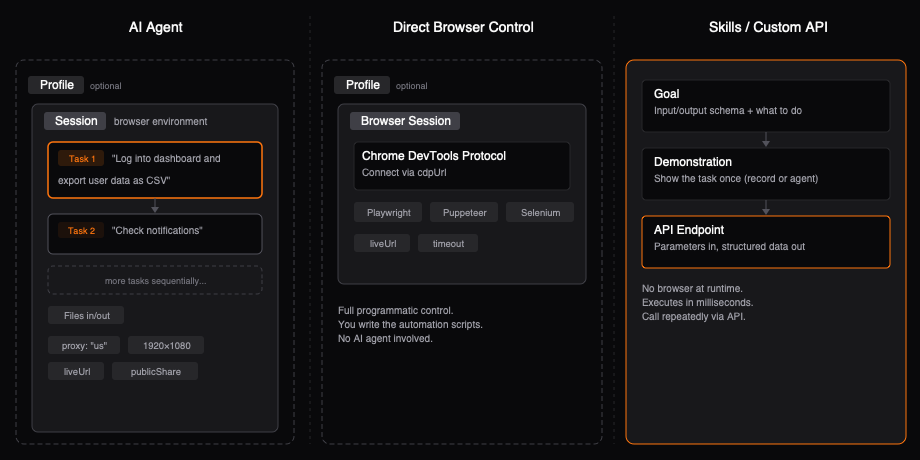
Automation Approaches
AI Agent
Give natural language instructions — the AI operates the browser for you.
A Session holds the browser environment. One or more Tasks run inside it sequentially — each task is a natural language prompt describing what the AI should do (e.g., “Log into Gmail and count unread emails”). Tasks can receive input Files (credentials, templates) and produce output Files (screenshots, CSVs). Optionally attach a Profile to preserve login state across sessions.
Sessions are optional for simple tasks — one is auto-created with US proxy if you don’t provide a sessionId. Create a session explicitly when you need multi-step workflows, custom proxy location, or screen dimensions.
Direct Browser Control
Full programmatic access via Chrome DevTools Protocol. Write your own automation with Playwright, Puppeteer, or Selenium.
A Browser Session gives you a cdpUrl to connect any CDP-compatible library. Optionally attach a Profile to start already logged in.
Skills
Describe what you need in plain text — get a production-ready API endpoint.
Define a Goal (input/output schema + what the endpoint does) and a Demonstration — either record yourself performing the task manually, or let the agent run it once automatically. The system builds a deterministic script you can call repeatedly. No browser or session needed at runtime — executes in milliseconds.
When to Use What
Core Concepts
- Profile: Preserves login state and browser settings across automations
- Session: AI agent environment for natural language task execution
- Browser: Direct Chrome DevTools Protocol access for custom automation
- Task: A natural language prompt describing what the AI agent should do
- Skill: Custom API endpoint built from a recording or agent prompt
- Files: Input data for tasks and output results from agents
How They Relate
- Profile is optional and shared — both AI Sessions and Browser Sessions can use one to inherit login state
- Session is optional for simple AI tasks (auto-created), but required for multi-step workflows, custom proxy, or screen size configuration
- Tasks always run inside a Session (explicit or auto-created) and execute sequentially
- Files attach to Tasks as input (data you provide) or output (results the agent generates)
- Skills are independent — they don’t use sessions, profiles, or browsers at runtime
- Browser Sessions are separate from AI Sessions — they give you raw CDP access instead of an AI agent